---
title: 2026 Engagement Workflow Update
description: The 2026 Engagement Workflow Update replaces the single setup wizard with a flexible, step-based experience. Teams can now add data incrementally, map fields with real-time feedback, configure procedures independently, and process or reprocess engagements as needed.
---
[Skip to content](https://help.auditminer.com/2026-engagement-workflow-update#main-content)
English
Show submenu for translations
[](https://www.auditminer.com)
Open main navigation
Close main navigation
- English
Show submenu for translations
- [Contact us](mailto:support@auditminer.com)
[Contact us](mailto:support@auditminer.com)
How can we help?
- There are no suggestions because the search field is empty.
1. [AuditMiner Resource Center](https://help.auditminer.com/?hsLang=en)
2. [Product Updates](https://help.auditminer.com/product-updates?hsLang=en)
3. [Product Overviews](https://help.auditminer.com/product-updates?hsLang=en#product-overviews)
# 2026 Engagement Workflow Update
## A more flexible way to manage and process engagements
We’ve redesigned the engagement experience to better reflect how audits actually happen.
Instead of requiring teams to complete a single setup wizard, engagements are now built through independent, flexible steps. You can add data as it becomes available, configure procedures separately, map money sources when needed, and process (or reprocess) at the right time for your engagement.
The goal of this update is simple: give your team more control and visibility throughout the engagement lifecycle.
### Table of Contents
- [Summary](https://help.auditminer.com/2026-engagement-workflow-update#summary)
- [Engagement Information](https://help.auditminer.com/2026-engagement-workflow-update#information)
- [Engagement Setup](https://help.auditminer.com/2026-engagement-workflow-update#setup)
- [Engagement Processing](https://help.auditminer.com/2026-engagement-workflow-update#processing)
### Update Summary
The new engagement flow should feel familiar. All we've done is reconfigure the process so you can work in the order or steps you prefer for each engagement. Primary changes include:
- Simplified table on main engagements page
- Engagement details page with clear actions and next steps
- Flexible engagement setup
- Money source mapping
- Immediate plan processing (no more waiting on manual reviews)
Watch the video below for a complete walkthrough.
[February 2026 Engagement Update Video](https://www.canva.com/design/DAHBsAvp5ME/u1-OAYHd6No2RhLyOcGh3g/watch?utm_content=DAHBsAvp5ME&utm_campaign=designshare&utm_medium=embeds&utm_source=link)
**ℹ️ Universal Recordkeeper Support**
We've also added new features to support previously non-integrated recordkeepers so you can run plans through AuditMiner for nearly any engagement.
Learn more about [Universal Recordkeeper Support here](https://help.auditminer.com/2026-universal-recordkeeper?hsLang=en)!
### Engagement Information
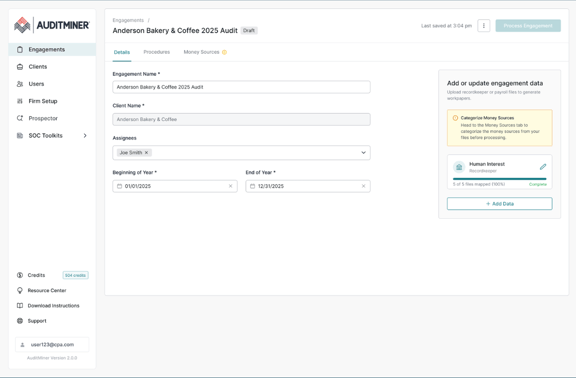
Engagement information can continued to be accessed from the main Engagements page with additional engagement details now available on a new Engagement Detail page.
To view the Engagement Detail page of a particular plan, click anywhere in the row of the plan you want to view. If you want to take action directly from the Engagements page, simply right click the plan to access the quick actions menu.
**Engagements page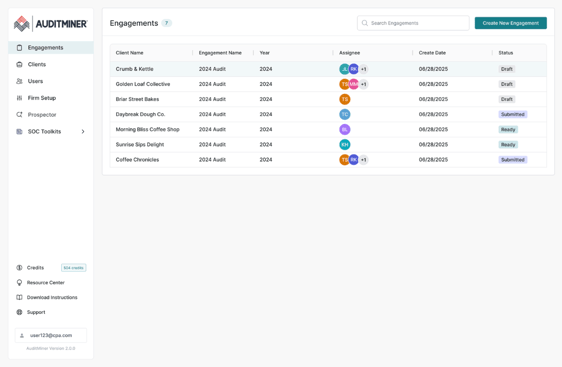**
**Engagement Detail page**
### Engagement Setup
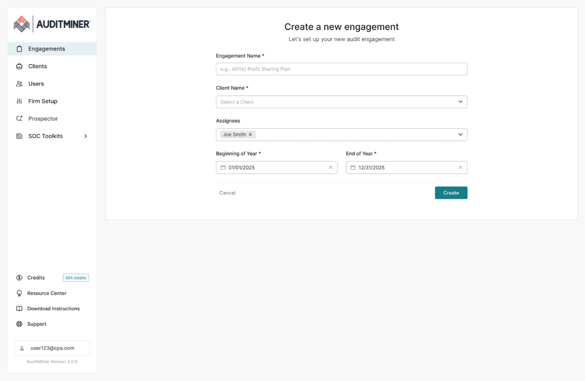
When you create an engagement you will land on a new engagement detail page. From there, you will choose which data provider(s) you wish to add and complete any steps necessary to process. You can come back to your engagement at any time to add more data or additional providers.
**Create Engagement page**
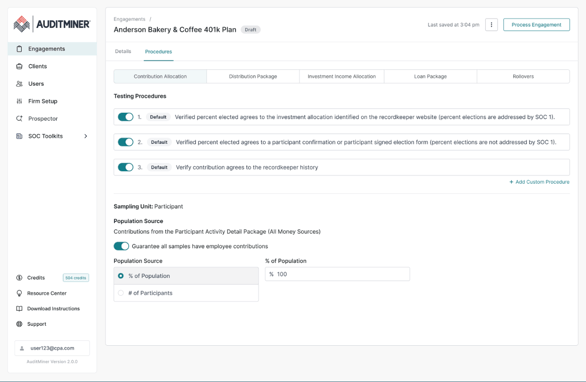
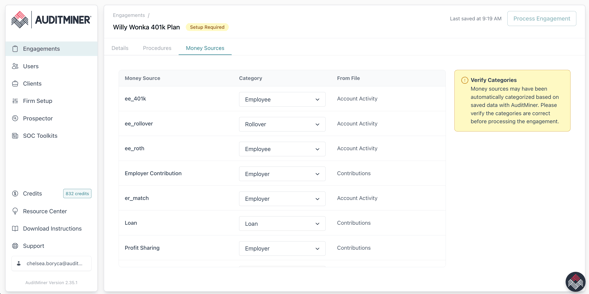
If you are adding recordkeeper data, the procedures and sampling will be separate from the data upload step. You will also see a new step to confirm and/or map money sources for the plan. This step was previously part of AuditMiner's review process, but we are now incorporating this into the setup process so that we can deliver results to you immediately.
**Engagement Detail page - Procedures**
**Engagement Detail page - Money Sources**
### Engagement Processing
When all required setup steps have been completed, the "Process Engagement" button on the Engagement Detail page will activate. If an engagement is not ready to process, banner messages and icons will be visible on the Engagement Detail page, explaining what steps remain.
**Engagement Detail page - Ready for Processing**
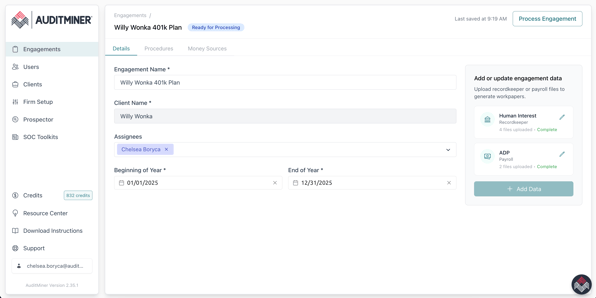
Once you are ready to process, simply press the "Process Engagement" button and your data will be processed, publishing workpapers and reports as soon as results are ready--usually in a few minutes. Once results are ready, you will receive an email notification just like you always have, and a new Results tab will appear on the Engagement Detail page.
**Engagement Detail page - Results**
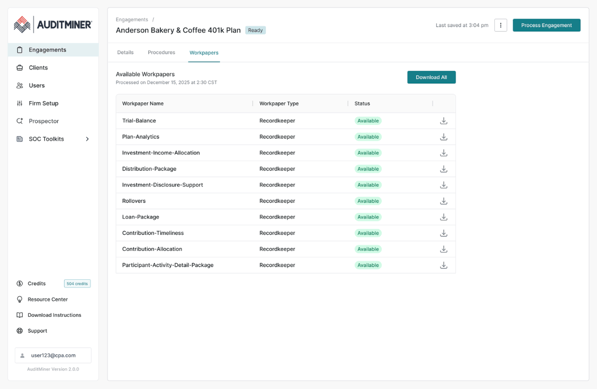
If you need to make changes to your engagement or add more data, you can always come back and reprocess your engagement at any time. Simply make your changes and press the "Process Engagement" button again. Your Results tab will display the date and time results were last processed.
- [Engagement Workflows](https://help.auditminer.com/engagement-workflows?hsLang=en)
- [Recordkeeper Engagements](https://help.auditminer.com/recordkeeper-engagements?hsLang=en#main-content)
- [Sampling](https://help.auditminer.com/recordkeeper-engagements?hsLang=en#sampling)
- [Workpaper Guides](https://help.auditminer.com/recordkeeper-engagements?hsLang=en#workpaper-guides)
- [Integrated Recordkeepers](https://help.auditminer.com/recordkeeper-engagements?hsLang=en#integrated-recordkeepers)
- [Payroll Engagements](https://help.auditminer.com/payroll-engagements?hsLang=en#main-content)
- [FAQs](https://help.auditminer.com/payroll-engagements?hsLang=en#faqs)
- [SOC Toolkits](https://help.auditminer.com/soc-toolkits?hsLang=en)
- [Admin, Credits, & Billing](https://help.auditminer.com/admin-credits-billing?hsLang=en#main-content)
- [Users & Permissions](https://help.auditminer.com/admin-credits-billing?hsLang=en#users-permissions)
- [Credits, Purchases & Billing](https://help.auditminer.com/admin-credits-billing?hsLang=en#credits-purchases-billing)
- [Product Updates](https://help.auditminer.com/product-updates?hsLang=en#main-content)
- [Release Notes](https://help.auditminer.com/product-updates?hsLang=en#release-notes)
- [Product Overviews](https://help.auditminer.com/product-updates?hsLang=en#product-overviews)
- [Troubleshooting](https://help.auditminer.com/troubleshooting?hsLang=en)
- [Resource Library](https://help.auditminer.com/resource-library?hsLang=en)
[mailto:support@auditminer.com](mailto:support@auditminer.com)
Copyright © 2025, AuditMiner Inc.